

 0

TS9 and CRC9 are different antenna interfaces. Choose the router end from the exact device specification, then choose the other end from the antenna lead you already have. A cable can have the right TS9 plug and still be wrong because its other end is RP-SMA instead of standard SMA.
If you are still deciding whether to add an antenna, start with external antennas versus LTE repeaters.
Identify the interface before choosing a plug
Start with the model label, including a regional or carrier suffix. Find “external antenna” in the device manual and confirm that the port is for the cellular radio. A Wi-Fi antenna connector or internal test point is a different connection. Search both spellings, TS9 / TS-9 or CRC9 / CRC-9, if the manual is difficult to find.
For example, NETGEAR’s MR1100 external-antenna table names two TS-9 connectors. Look up your own model in the same way; connector types can vary within a brand.
Which diameter does “3.5 mm” describe?
| Type | Female socket housing, outside diameter | Male plug, outside diameter |
|---|---|---|
| TS9 | 3.5 mm | 3.8 mm |
| CRC9 | 3.0 mm | 3.7 mm |
The 0.5 mm difference applies to the socket housings. The plug outside diameters in this table differ by only 0.1 mm. Powertec notes variation in TS9 male construction, so use these values as identification clues and the exact part drawing for dimensions and tolerances.
If the port is recessed or the documentation is missing, send the full device model and a well-lit photograph of the port and its label to the manufacturer. Do not probe the centre contact with a measuring tool or test an unknown plug by forcing it in. If the manual says CRC9, a TS9 plug is already ruled out; “TS9/CRC9 compatible” in a seller’s heading does not override the device specification.
Two TS9 cables can have different antenna ends
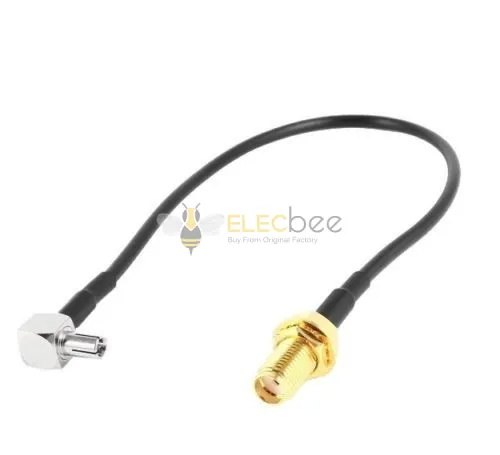
The two Elecbee products below both list a right-angle TS9 male at the router end. Their antenna ends differ. Read the complete connector name and the centre contact, not just the gold-coloured threaded body.
Standard SMA female

EB-101-0659
30 cm RG174 · listed 50 Ω
Standard SMA female has a centre socket.
RP-SMA female

EB-101-0658
15 cm RG316 · listed 50 Ω
RP-SMA female has a centre pin.
Both female bodies have external threads; look at the centre contact to tell them apart.


Schematic mating-face views, not to scale. See Delock’s SMA / RP-SMA reference for the centre-contact arrangements.
A standard SMA male antenna lead needs the matching standard SMA female on the adapter. Pairing it with RP-SMA female puts the wrong centre contacts together even if the threads appear to agree. An RP-SMA male lead needs the corresponding RP-SMA female.
Worked example: a TS9 router and an SMA antenna lead
Suppose your device is an MR1100 variant listed in NETGEAR’s table, and your antenna has standard SMA male leads. You can narrow the cable choice as follows:
- The cable needs a TS9 plug at the router end and standard SMA female at the antenna end.
- EB-101-0659 has those interfaces. Exclude EB-101-0658 for this antenna because its other end is RP-SMA female.
- EB-101-0659 contains one 30 cm RG174 cable with a right-angle TS9 plug. Check the route for enough length without tension and space around the plug body.
- Match the antenna bands and impedance, then check assembly loss at the frequencies you will use. For a documented two-lead MIMO setup, allow one adapter per lead.
Before ordering EB-101-0659
View the standard SMA female–TS9 male, 30 cm assembly as an interface-matched candidate. Confirm that the plug clears your MR1100 port recess and that the assembly meets your RF requirements.
If your router instead specifies CRC9, neither TS9 cable above is the candidate. Start again with a CRC9 male plus the actual antenna-side connector in RF Cable Assemblies. A CRC9 cable ending in FAKRA, for example, would still not complete an SMA antenna connection. If the antenna already has the correct router plugs on its leads, a separate adapter may be unnecessary.
For a listing question, send Elecbee the SKU, full router model, antenna connector specification and the unresolved requirement through Contact Us. For example: “Does EB-101-0659 clear this recessed port, and what is its assembly loss at my operating band?”
Check external-port bands and MIMO connections
Choose the antenna against the bands available through the device’s external ports, not only the bands advertised for the router as a whole. NETGEAR lists different external-port band support for MR1100 regional variants:
| Variant | Band 28 | Band 66 |
|---|---|---|
| MR1100-100EUS | Listed | Not listed |
| MR1100-100NAS | Not listed | Listed |
For all supported external-port bands, read your variant’s full row in NETGEAR’s external-antenna table.
For multiple antenna paths, follow both the device and antenna instructions. NETGEAR’s external-antenna guide describes a MIMO antenna supplied with two SMA-to-TS9 adapters. The separate leads serve separate paths; splitting one connection into two is not equivalent.
Ask for assembly loss at your operating frequency and cable length. The two products above differ in both cable type and length, so their specifications alone cannot tell you which has lower loss. The “50 Ω” field gives nominal impedance; you still need a separate loss figure, even if the listing includes a frequency range.
Connect without loading the small router port
Follow the device’s power and external-antenna settings instructions. Align the confirmed parts and hold the connector body. Support the cable so its weight does not pull the plug sideways, and leave a relaxed route at the right-angle exit. Stop if the fit is unexpectedly tight, loose or unstable; do not bend the plug to make it grip. NETGEAR warns that these TS9 connections can be delicate.
After connection, compare reception and stability in the intended location. Keep router placement and test conditions similar, and use the device’s signal measurements alongside repeatable data tests where available. If performance worsens, check the selected ports, settings, band support and cable connections before changing antenna position. An external antenna may improve reception without increasing speed.