

 0
0
To choose a replacement FFC cable, match its conductor count, contact pitch, contact layout and end dimensions to the original cable and both connectors. Also allow for the cable route and the equipment’s electrical requirements.
Start with the original cable part number or the device’s service documentation. If the specification is incomplete, record the missing dimensions using the checks below.
Identify the original cable
An ordinary flexible flat cable (FFC) has parallel conductors running along a flat strip. A flexible printed circuit (FPC) can have routed traces, branches, components or features made for a particular device. Sellers sometimes use “FFC,” “FPC” and “ribbon cable” loosely, so the name in a listing is only a starting point. Our FFC and FPC comparison explains the broader distinction.
If the original is a shaped camera flex, a display assembly cable or another device-specific part, look for the exact replacement part number first. A generic strip with the same number of contacts may not reproduce its connections or signal requirements.
Before removing a cable, disconnect the equipment from power and follow its service instructions, including battery isolation where applicable. Photograph both ends in place, the connector latches and any markings. Record which face points toward each board. Open a latch only by the method specified for that connector; do not pull harder to release a cable that is still locked.
Count the contacts, then measure between their centers
Count the exposed metal contacts at each end under magnification. An ordinary straight FFC should not be identified by its overall width or by the number of lines visible through the insulation. Record the contact count at both ends rather than assuming they are identical.

Measure between the yellow contact centers. The cable edges lie outside this span.
Use several intervals
Pitch is the center-to-center spacing of adjacent contacts. For equally spaced contacts, measuring across several intervals is easier than trying to read one tiny gap.
For example, eight contact centers spanning 3.5 mm contain seven intervals: 3.5 ÷ 7 = 0.5 mm.
Use suitable magnification and measuring equipment. If you cannot identify the centers reliably, use a part drawing or ask for dimensional confirmation rather than rounding to the nearest listing.
The overall cable width includes edge margins. Dividing that width by the contact count is therefore not a reliable general method. Molex’s FFC dimensional specification, for example, lists the contact span and total width separately. When reading a connector specification, look for the cable contact pitch, not just the PCB mounting pitch. Hirose’s FH12-16S-0.5SVA(54) lists a 0.5 mm contact pitch and a 1 mm mounting pitch as separate dimensions.
Check the exposed metal at both ends
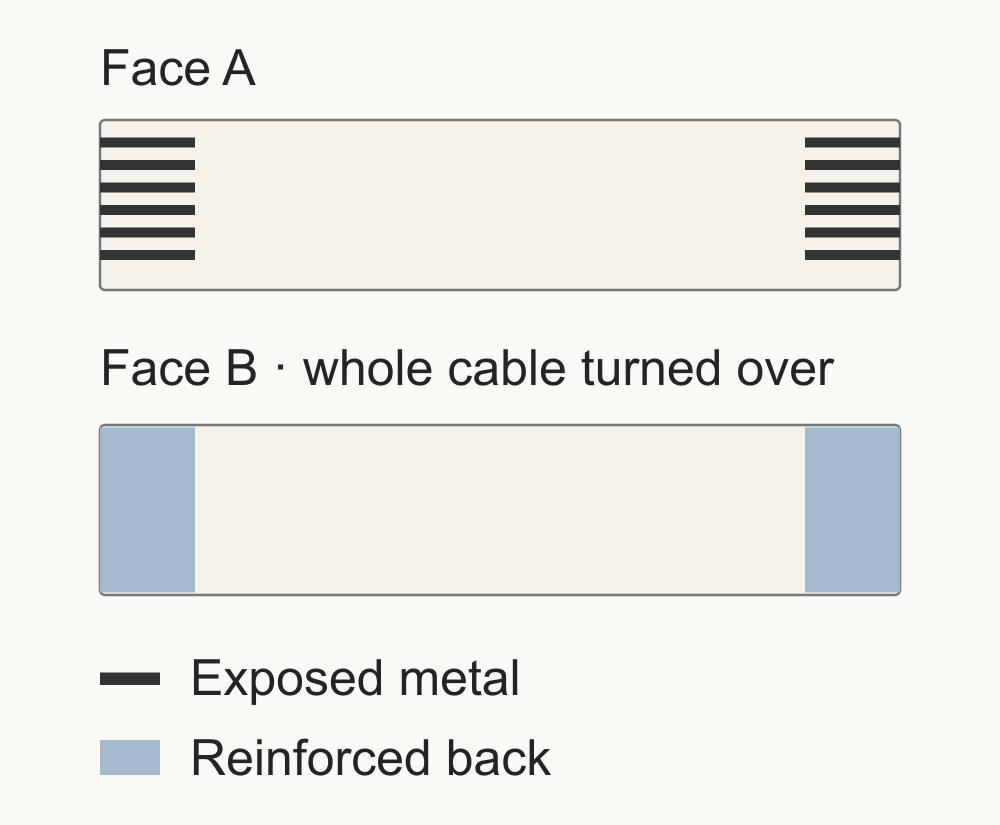
View the cable laid out without a twist, or use its drawing if it has a permanent fold. Compare the faces carrying the exposed contacts at the two ends. The stiffener is the reinforced tab behind an end. Its color does not identify the contact layout.
Same-side contacts
Opposite-side contacts

Turn the cable over along its long axis, keeping the same ends at left and right. Black marks exposed metal; blue marks the reinforced back. These schematic views show contact layout, not a specific pin count.
Type letters vary between suppliers. Molex’s Premo-Flex 15166 series uses Type A for same-side contacts and Type D for opposite-side contacts. The Elecbee examples below instead use A for same-side and B for opposite-side. Match the stated contact layout when comparing these ranges.
The cable’s metal must face the connector contacts at each end. A connector’s “top contact,” “bottom contact” or “dual contact” description is a different piece of information from the cable’s same-side/opposite-side layout. Confirm the connector’s viewing direction and insertion instructions in its drawing.
Check pin-to-pin connections in the equipment’s wiring diagram or specified replacement part. Contact-face orientation alone does not identify the pin mapping, and turning a cable over may not correct a mismatch.
Match the part that actually enters the connector
Measure the complete end that enters the connector, including its reinforcement. It can be thicker than the flexible middle of the cable.
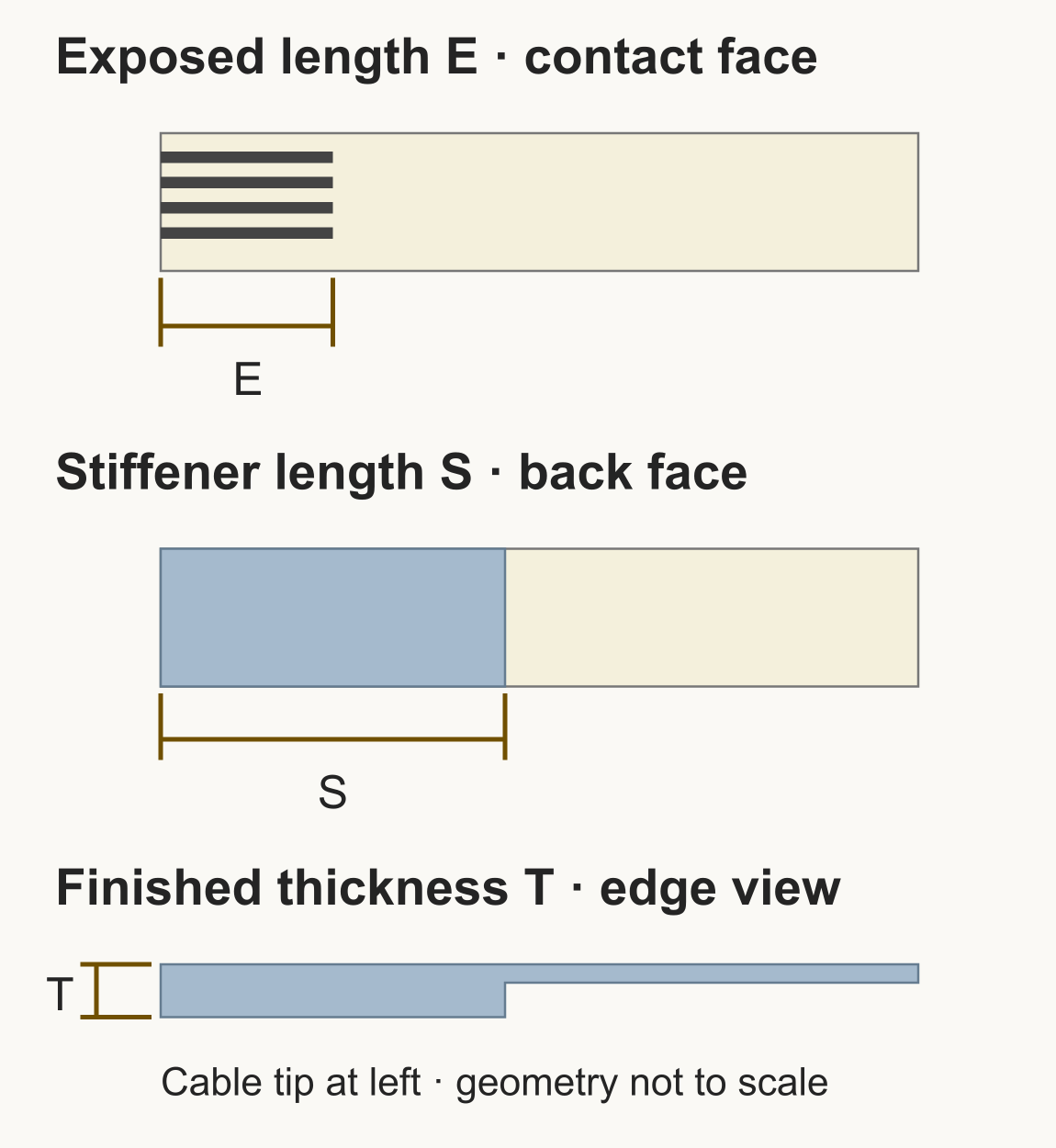
E and S start at the cable tip in this schematic. T includes the reinforcement. Use the part drawing for exact measurement points and tolerances.
Measure different features separately
Exposed contact length: the bare metal available for contact. It is not the same dimension as the reinforcement behind it.
Stiffener length: the reinforced area on the back. It can extend beyond the exposed metal; check clearance behind the connector as well as insertion.
Finished end thickness: the complete thickness that enters the connector, including reinforcement. A nominal “0.3 mm” listing still needs its measurement location and tolerance checked.
Width and outline: match the connector’s recommended cable drawing, including edge margins, notches or locking ears. Contact count does not define these features.
The Hirose model linked above accepts a specified 0.3 mm FFC/FPC thickness; other connector models may require a different thickness. GCT’s FFC guide also distinguishes conductor exposure, supporting strips and retention ears.
Do not add tape, trim the cable end or force a thicker cable into the socket to make an uncertain match fit. If the latch is broken, or the contacts or reinforcement are damaged, replacing the cable alone may not solve the problem.
Check the route and operating conditions
Record the specified overall length from end to end, then compare it with the route through the equipment. Allow the intended slack and connector approach without tension, rubbing or a sharp fold at an end. The supplier’s drawing should define how the length is measured, especially for pre-folded or shaped cables.
Use a length permitted by the equipment specification. Also match its signal, shielding, current, voltage and temperature requirements. If the cable moves in use, as it would on a moving printhead, check its rated flex life.
Molex’s Premo-Flex selection guide treats shielding, speed, temperature and flex life as separate selection requirements. Use the original cable specification or equipment documentation for the values you need. A continuity check, even if carried out correctly on an isolated cable, does not establish high-speed performance or suitability under load.
Turn the measurements into a purchase specification
Once the requirements are clear, browse Flat Flex Cables (FFC, FPC) by pitch, number of positions, contact layout and length. Open the individual item to compare its end dimensions and application specifications with your record.
Worked example: two similar 12-contact cables
Suppose your original-cable record specifies 12 contacts at each end, a first-to-last centre span of 5.5 mm, 100 mm overall length and opposite-side contacts. Its specified exposed ends are 4 mm, stiffeners 8 mm and finished mating ends 0.3 mm.
The pitch calculation is 5.5 ÷ (12 − 1) = 0.5 mm. The two listings below both match that pitch and contact count:
Same-side listing · 94238
EB-FFC-0.5-12-100-A-4-8

Opposite-side listing · 94239
EB-FFC-0.5-12-100-B-4-8
Product photographs from the linked Elecbee listings. Read dimensions from the specifications and drawings.
| Listed field | 94238 · A | 94239 · B |
|---|---|---|
| Contacts / pitch | 12 / 0.5 mm | 12 / 0.5 mm |
| Overall length | 100 mm | 100 mm |
| Exposed / stiffener | 4 / 8 mm | 4 / 8 mm |
| Listed thickness | 0.3 mm | 0.3 mm |
| Contact layout | Same-side Exclude for this example |
Opposite-side Keep as a candidate |
94239 matches the listed requirements for this example. The 4-position EB-JS05B-04P-100-4-8 is excluded even though its pitch, length and opposite-side layout agree: it has only four contacts.
To finish the match for 94239, compare its dimensioned mating-end drawing with both board connectors. In particular, confirm that the listed 0.3 mm describes the complete reinforced end, check its tolerance and outline, and verify the equipment’s electrical and flex-life requirements.
Both 12-contact listings specify tin-plated contacts, despite using “gold finger” in their titles. If your application requires a particular plating, confirm the contact finish for the exact SKU.
If you need the board-mounted connector rather than the cable, use the FFC/FPC connector category. Replacing a connector also requires its PCB footprint, mounting height and latch arrangement to match; cable specifications alone cannot identify the soldered part.
If you cannot finish the match
Keep the original cable. If a listing leaves a required dimension unclear, use Elecbee’s contact page to send the SKU, device and part numbers, your measurements and clear photographs of both cable ends and faces. Mark the dimension you need confirmed.
Resolve conflicting listing details before ordering. For an unidentified device-specific flex, unknown pin connections or a damaged board connector, use the device’s service documentation or a qualified repair service.