

 0
0
USB connector guide
Mini USB and Micro USB are two different compact USB connector standards, and their plugs cannot mate directly with each other's ports. In everyday use, Mini USB refers to the standard 5-pin USB Mini-B interface, which has a thicker, stepped profile. Micro USB usually refers to the much flatter 5-pin USB 2.0 Micro-B interface, or the wider two-section 10-pin USB 3.x Micro-B interface used on higher-speed devices. Because standard Mini-B and USB 2.0 Micro-B both use five internal contacts, a "5-pin USB" label alone does not tell you which connector a device requires.
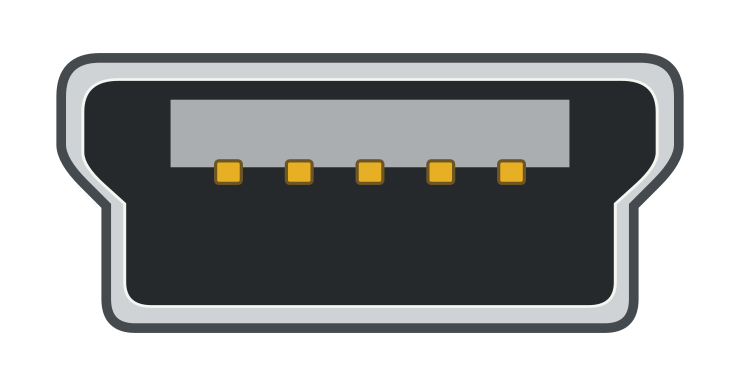
Mini-B
Thicker, stepped sides

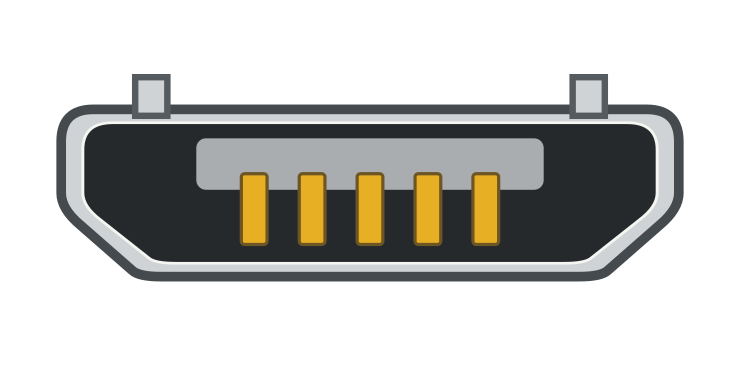
USB 2.0 Micro-B
Flatter, bevelled corners

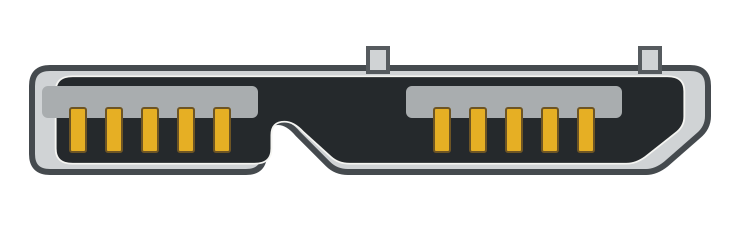
USB 3.x Micro-B
Wide, two-section profile

Despite their different shapes, standard 5-pin Mini-B and 5-pin USB 2.0 Micro-B share the same 480 Mbps USB 2.0 signaling rate limit, and neither connector shape sets a fixed charging speed. Higher 5 Gbps or 10 Gbps transfer modes are available through the wide 10-pin USB 3.x Micro-B interface when the device controller, cable, and host all support the corresponding mode. The host connector may be USB-A or USB-C. Passive adapters can convert plug shapes in the right male-to-female direction, while connecting external USB peripherals still depends on whether a device has built-in host support and adequate power.
| Feature | Standard Mini USB (Mini-B) | Standard Micro USB (USB 2.0 Micro-B) | Wide Micro USB (USB 3.x Micro-B) |
|---|---|---|---|
| Shape & Profile (Facing the Connector End) | Standard Mini USB (Mini-B)Thick, taller trapezoid with stepped sides; smooth plug shell | Standard Micro USB (USB 2.0 Micro-B)Much flatter, low-profile bevelled trapezoid; plug has 2 small latch hooks on its flat face | Wide Micro USB (USB 3.x Micro-B)Wide, two-part asymmetric profile (5-pin Micro-B side plus an adjacent 5-pin extension) |
| Pin Count | Standard Mini USB (Mini-B)5 pins (cannot be distinguished from 2.0 Micro-B by pin count alone) | Standard Micro USB (USB 2.0 Micro-B)5 pins | Wide Micro USB (USB 3.x Micro-B)10 pins total (5-pin USB 2.0 section + 5-pin SuperSpeed section) |
| Direct Port Compatibility | Standard Mini USB (Mini-B)Fits Mini-B ports only (does not mate with any Micro USB port) | Standard Micro USB (USB 2.0 Micro-B)Fits USB 2.0 Micro-B/AB ports and the 5-pin side of wide USB 3.x Micro-B/AB ports | Wide Micro USB (USB 3.x Micro-B)Fits wide USB 3.x Micro-B/AB ports only (blocked by standard 5-pin Micro-B ports) |
| Data Transfer Speed Potential | Standard Mini USB (Mini-B)Up to 480 Mbps (USB 2.0 High-Speed); some devices operate at 12 Mbps (Full-Speed) | Standard Micro USB (USB 2.0 Micro-B)Up to 480 Mbps (USB 2.0 High-Speed) | Wide Micro USB (USB 3.x Micro-B)Supports SuperSpeed 5 Gbps (or 10 Gbps) when the device controller, cable, and host port all support that mode |
| Charging Capability | Standard Mini USB (Mini-B)Depends on the power source, supported charging method, device design, and cable | Standard Micro USB (USB 2.0 Micro-B)Depends on the power source, supported charging method, device design, and cable | Wide Micro USB (USB 3.x Micro-B)Depends on the host or charger, device design, and cable |
Legacy Mini-A/Mini-AB ports are not included in this comparison.
How to Identify Mini USB vs. Micro USB
Standard 5-Pin Mini-B vs. USB 2.0 Micro-B
To tell Mini USB and Micro USB apart, look straight into the mating face of the connector, keeping in mind whether you are looking at the metal tip of a cable plug (male) or the recessed port opening on a device (female receptacle).
A standard USB Mini-B interface has a thicker, stepped cross-section. Looking straight at the mating face, one parallel side is wider than the opposite side, and the two angled walls step inward with distinct notches. On a Mini-B cable plug, the outer metal shell is smooth because retention relies on internal detent geometry inside the mating receptacle (USB 2.0 Specification and Mini-B ECN package).
A standard USB 2.0 Micro-B interface has a much flatter, lower-profile cross-section shaped like a shallow bevelled trapezoid without stepped side walls. On a Micro-B cable plug, two tiny metal latch hooks protrude from the flat outer face near the tip and engage cutouts inside the device receptacle. The specification places these latching springs on the replaceable cable plug and sets a component qualification test rating of 10,000 insertion cycles for Micro-B, compared with 5,000 test cycles for Mini-B (USB 2.0 Specification and Mini-B ECN package). Those cycle figures are laboratory compliance benchmarks for connectors rather than a guarantee that every product will last a set number of years or that a device socket can never wear out.


Both standard Mini-B and USB 2.0 Micro-B use five internal contacts (VBUS power, ground, D+/D− data, and an identification pin). Because the pin count is identical, reading "5-pin USB" in a product title or manual is not enough to identify the port; you need both the connector name (Mini-B vs. Micro-B) and the mating-face outline.
Common Lookalikes: Wide USB 3.x Micro-B, Standard-B, USB-C, and Camera Ports
Several other connectors often appear alongside Mini and Micro USB on equipment and cables:
USB 2.0 Standard-B

USB-C

- Wide USB 3.x Micro-B: Frequently used on portable external hard drives, this interface joins a 5-pin Micro-B section side-by-side with a second 5-pin SuperSpeed section separated by a small notch (USB 3.1 Legacy Cable and Connector Specification).
- USB Standard-B: Common on desktop printers, scanners, and audio interfaces, Standard-B is a tall, nearly square connector with two bevelled corners. Catalog filters that say "USB-B" sometimes group full-size Standard-B, Mini-B, and Micro-B together, so check the exact subtype before ordering.
- USB-C: A smooth, rounded-oval connector with symmetrical upper and lower halves and reversible plug orientation. It often appears on the computer or charger end of a
USB-C to Mini-BorUSB-C to Micro-Bcable. - Proprietary 8-pin and camera ports: Standard 5-pin USB Mini-B is an official USB-IF connector used across dash cams, microphones, controllers, and portable recorders, not a proprietary camera port. However, some older compact cameras and handheld devices use vendor-specific 8-pin or multi-pin receptacles that look similar at a glance and are sometimes sold under generic "mini USB 8-pin" descriptions. A small port outline or a "mini" label in a listing does not prove compatibility with standard 5-pin Mini-B or Micro-B, so verify the exact model manual if a camera or specialty port looks unusual.
Data Transfer Speed: Mini USB vs. Micro USB

USB 2.0 Speed Limits and Real File Transfers
For standard 5-pin connectors, Mini-B and USB 2.0 Micro-B have the same protocol speed ceiling. Both are defined for USB 2.0 systems, where standard detachable cables support signaling rates up to 480 Mbps (High-Speed) as well as 12 Mbps (Full-Speed) (USB 2.0 Specification).
In real-world use, two USB 2.0 devices can still transfer files at very different speeds regardless of whether they use Mini-B or Micro-B:
- Device controller capability (12 Mbps vs. 480 Mbps): If a device is built with a USB Full-Speed (12 Mbps) internal controller, connecting it with a 480 Mbps High-Speed cable will not upgrade the device above 12 Mbps.
- Signaling rate vs. file copy speed: Even when both the host and device operate in USB 2.0 High-Speed mode, 480 Mbps is the physical-layer bit signaling rate before protocol overhead, bus sharing, and internal storage limits. Actual file transfer speeds depend on the host controller, the device's storage media, and the quality of the cable connection rather than reaching a theoretical 60 MB/s.
Wide USB 3.x Micro-B and SuperSpeed Modes
The wide 10-pin USB 3.x Micro-B connector belongs to a higher protocol tier. Its five extra contacts provide two shielded differential signal pairs (transmit and receive) and a drain ground for SuperSpeed data transfer (USB 3.1 Legacy Cable and Connector Specification).
Depending on the hardware, this interface can support 5 Gbps or 10 Gbps SuperSpeed operation. Reaching either mode requires support across the entire link: the device's internal controller and wide Micro-B port, a full 10-pin USB 3.x Micro-B cable, and a compatible SuperSpeed host port (typically a USB 3.x Standard-A or USB-C port on the computer) (USB-IF USB 3.2 Language Product and Packaging Guidelines). You cannot tell whether a wide Micro-B device supports 5 Gbps or 10 Gbps from the receptacle shape alone, and physical connection does not guarantee a specific real-world transfer speed.
Charging and Power Differences

Why Connector Shape Does Not Set Charging Speed
A common myth claims that Mini USB is limited to 0.5 A (500 mA) while Micro USB delivers 2 A and charges four times faster. In reality, connector shape does not determine how fast a device charges. Three separate factors govern USB power delivery:
- Standard USB 2.0 computer bus-power rules: The USB 2.0 Specification defines power on a standard computer or hub data port in 100 mA unit loads: up to 100 mA before configuration and up to 500 mA (five unit loads) for a configured high-power bus-powered device. That 500 mA limit is a rule for standard USB 2.0 data ports on a host or hub, not the physical ceiling of a Mini-B connector.
- Component contact ratings vs. charging protocols: USB-IF connector specifications qualify the metal power and ground contacts inside Mini-B and Micro-B connectors against laboratory current-carrying tests so the contacts do not overheat (USB 2.0 and Mini-B ECN package; USB 3.1 Legacy Cable and Connector Specification). Those component test ratings do not act as a charging protocol, so plugging in a Micro-B cable does not automatically make a device draw 2 A.
- Power source, charging method, and cable connection: Actual charging current depends on the power supply, the charging method supported by the device's internal circuitry, and the voltage drop across the cable and connectors. Dedicated charging standards such as USB Battery Charging (BC 1.2) use signaling on the D+ and D− lines so a device can identify a dedicated charger or charging downstream port and draw higher current than a standard data port allows (Microchip: Battery Charging with USB).
Checking the input rating printed on a device or in its manual gives you a useful starting clue, but achieving that rate also requires a charger that supports the same charging method and a suitable cable. Adding a passive Mini-to-Micro adapter does not add new charging protocols or raise the maximum power the device supports.
Charging-Only Cables vs. Data Cables
A cable that lights up a device's charging indicator only confirms that power is reaching the port. For standard 5-pin Mini-B and USB 2.0 Micro-B connections, transferring files, updating firmware, or recognizing a device on a computer requires a usable USB data path over the D+ and D− lines. Wide USB 3.x Micro-B connections use the additional signal pairs for SuperSpeed data.

Some power cords omit a usable USB data path and therefore cannot sync files. At the same time, an inability to transfer files does not prove a cable contains only two internal wires or that all power-only cords charge at the same speed, because dedicated charging ports and certain power adapters use the D+/D− contacts for charger identification without running USB data enumeration (Microchip: Battery Charging with USB).
When a Mini USB or Micro USB device charges on a computer but does not appear for file transfer, check two things:
- The cable: Switch to a cable explicitly specified for data sync and charging.
- The device port and software mode: Some equipment uses a Mini-B or Micro-B socket strictly as a DC power input with no data electronics wired behind it, and many phones or media devices default to a charge-only mode until file transfer is enabled on screen.
Compatibility, Adapters, and Connecting Devices
Physical Mating and One-Way USB 3.x Fit
Mini-B and Micro-B connectors have incompatible shell outlines and will not mate with each other; never force an unmatched plug into a port, as doing so can bend the contacts or split the receptacle housing. Within the Mini and Micro interfaces compared here, the specifications define these mating rules (USB 2.0 and Mini-B ECN package; USB 3.1 Legacy Cable and Connector Specification):
- Standard 5-pin Mini-B ports mate only with standard 5-pin Mini-B plugs.
- Standard 5-pin USB 2.0 Micro-B ports mate only with standard 5-pin USB 2.0 Micro-B plugs and physically block Mini-B, Micro-A, and wide 10-pin USB 3.x Micro-B plugs.
- Wide 10-pin USB 3.x Micro-B ports mate with either a 10-pin USB 3.x Micro-B plug or a standard 5-pin USB 2.0 Micro-B plug inserted into the 5-pin USB 2.0 side of the receptacle.
- Micro-AB ports (specified for On-The-Go and Embedded Host equipment) accept either a Micro-A plug or a Micro-B plug of the matching generation, with USB 3.x Micro-AB ports also accepting USB 2.0 Micro-A and Micro-B plugs.
This one-way backward compatibility inside the Micro family means a standard 5-pin USB 2.0 Micro-B cable can plug into the 5-pin side of a wide USB 3.x Micro-B port on an external drive. For that fallback connection to transfer files, the drive must support USB 2.0 operation, the 5-pin cable must provide a working USB 2.0 data path, and the drive must receive enough power to run. Transfers then operate at USB 2.0 speeds. Going the other way is blocked because the extra 5-pin SuperSpeed section on a wide USB 3.x Micro-B plug cannot fit into a standard 5-pin Micro-B port.

Using Mini-to-Micro Adapters and USB Host Limits
If you have an existing cable connected to a computer or charger and need to match the other connector shape at the device end, a directional passive adapter can convert the tip. For example, a Micro-B male to Mini-B female adapter (such as the configuration shown in the StarTech UUSBMUSBMF6 datasheet) takes a standard Mini-B male cable plug and converts it into a Micro-B male plug for a Micro-B device.

When using an adapter or cable to connect equipment, keep two limits in mind:
- Match the male and female direction: Converting a Mini-B cable end for a Micro-B port requires a Mini-B female to Micro-B male adapter, whereas adapting a Micro-B cable for a Mini-B port requires the reverse gender combination.
- Connecting USB peripherals (OTG and host support): Attaching a flash drive, keyboard, mouse, or audio interface directly to a portable device requires a device capable of acting as the USB host and a suitable power arrangement for the peripheral. You cannot tell whether a device supports host mode from the shape of its Mini USB or Micro USB port, and a passive adapter or standard
USB-A to Micro-Bcable will not add host capability to hardware that lacks it. Direct peripheral connections require compatible controller hardware, firmware, power arrangements, and a cable or adapter intended for the device's host mode (USB On-The-Go and Embedded Host Supplement, in the USB 2.0 package).
Choosing the Right Cable for Your Device
Before picking a replacement cord or adapter, verify four details:
-
Device port shape: Look straight at the equipment socket to confirm whether it is a stepped 5-pin Mini-B, a flat 5-pin USB 2.0 Micro-B, or a two-part 10-pin USB 3.x Micro-B port (and check the model manual if a camera or instrument port looks like a proprietary 8-pin socket).
-
Opposite cable end: Check whether the computer, hub, or charger uses a USB Standard-A port or a USB-C port, or confirm the required male/female direction if adding an adapter.
-
Data vs. power-only use: Choose a cable specified for data sync and charging whenever you need file transfers, firmware updates, or PC communication, and choose a full 10-pin SuperSpeed cable and host port that support the same 5 Gbps or 10 Gbps mode as your wide Micro-B device.
-
Length and plug angle: In tight mounting spaces such as dash cams or enclosures, check both the cable length and how a 90-degree angled plug is oriented relative to the mating face.


To browse finished cords by both connector ends, gender, or angled orientation, visit the USB Cables category and check that the listing specifies your exact connector pair and data-transfer support. If you are sourcing board-mount sockets or plugs for circuit repair rather than a finished cord, use the separate USB Connectors category.