

Search for products...

1. Get Your Coupon
Go to our Coupon Center to claim the coupons you want.
Each coupon will show its value, validity period, and minimum order amount (if any).
Tip: Make sure to log in to your account before claiming the coupon.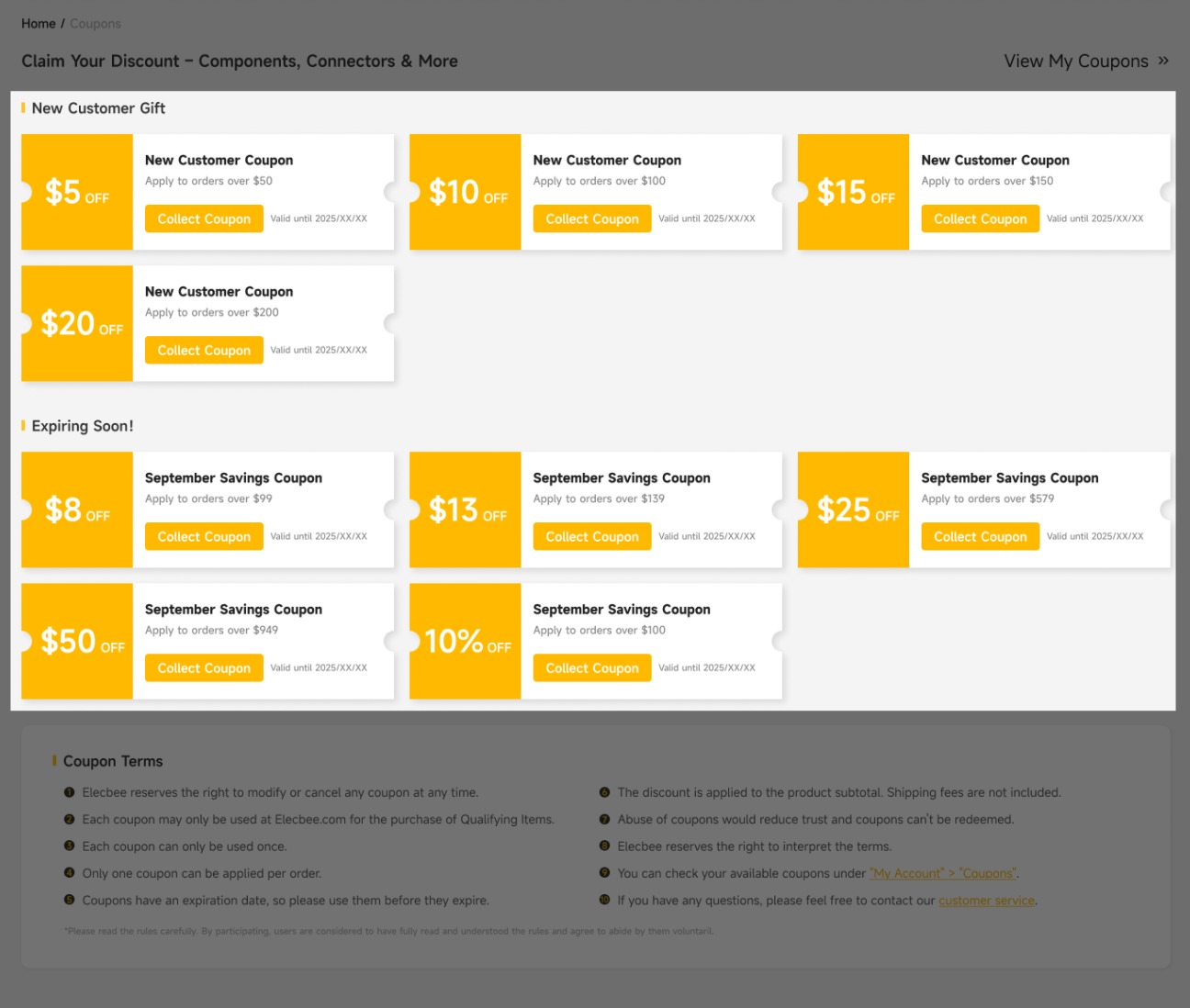
2. Add Items to Your Cart
Add your favorite products to the shopping cart.
Make sure your order total meets the coupon’s usage requirement.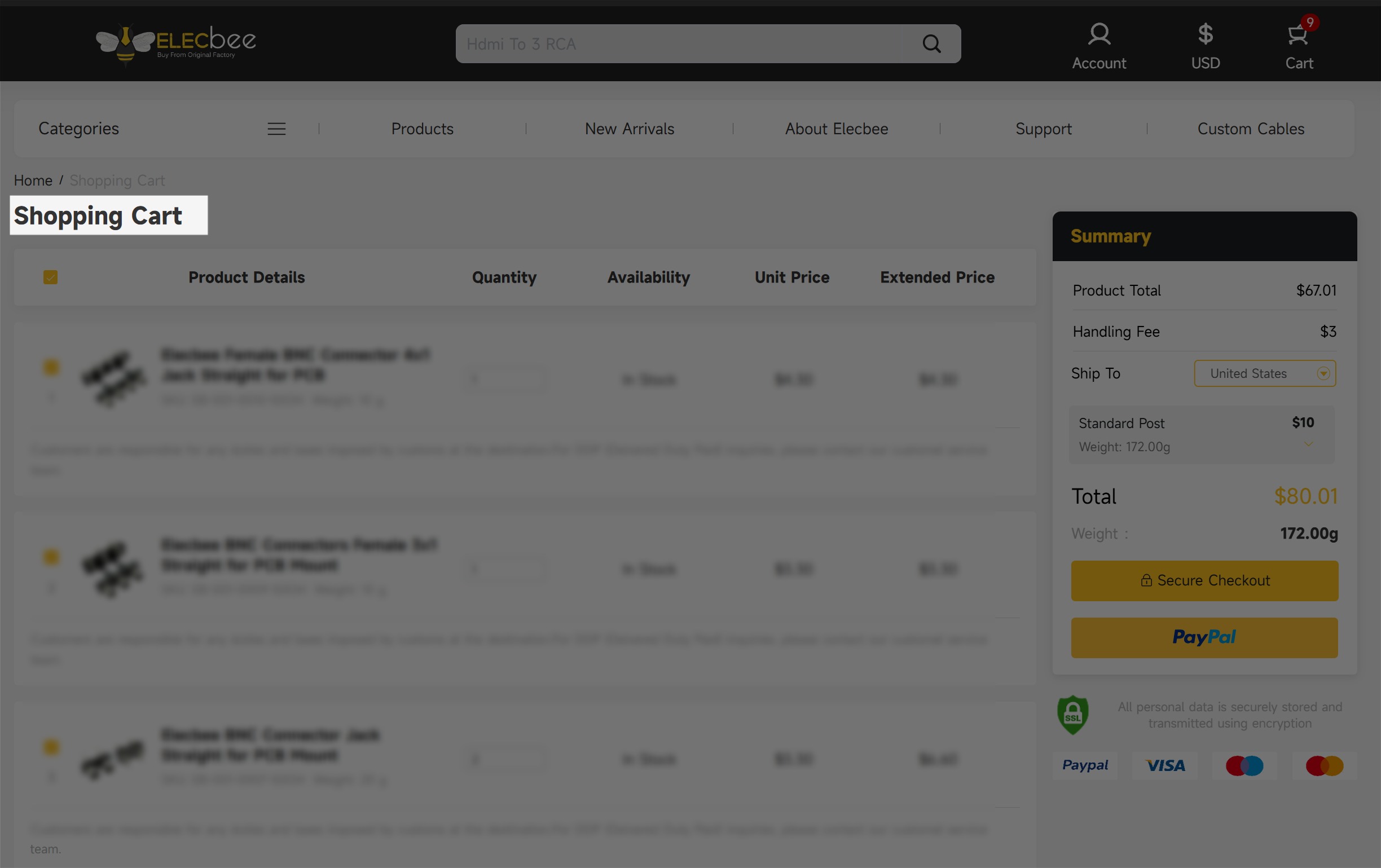
3. Automatic Application at Checkout
When your order meets the condition:
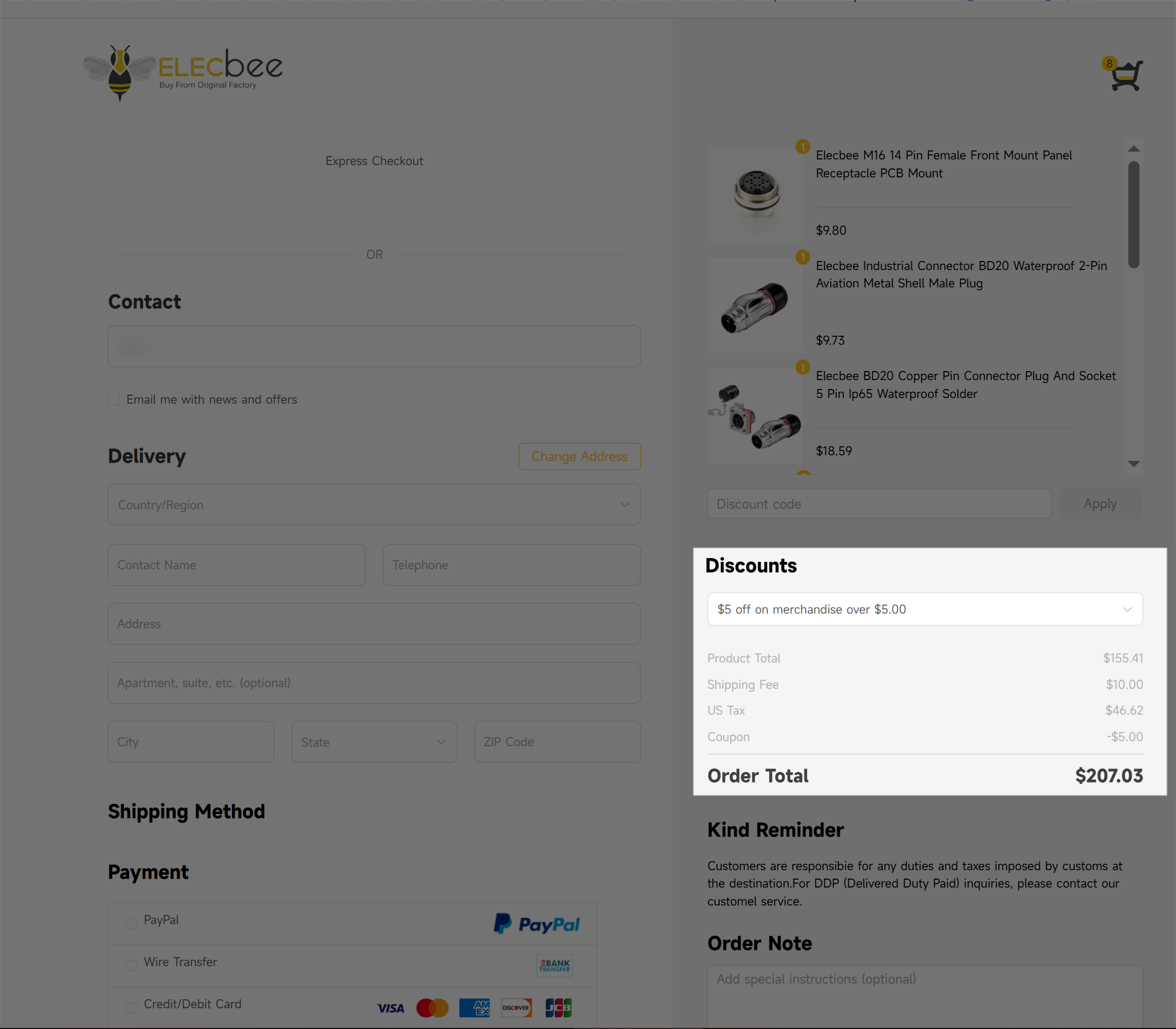
• The eligible coupon will automatically appear in the “Discount” section on the checkout page.
• It will be checked and applied by default when your order meets the requirement.
You’ll see the discount amount deducted from your order total immediately.
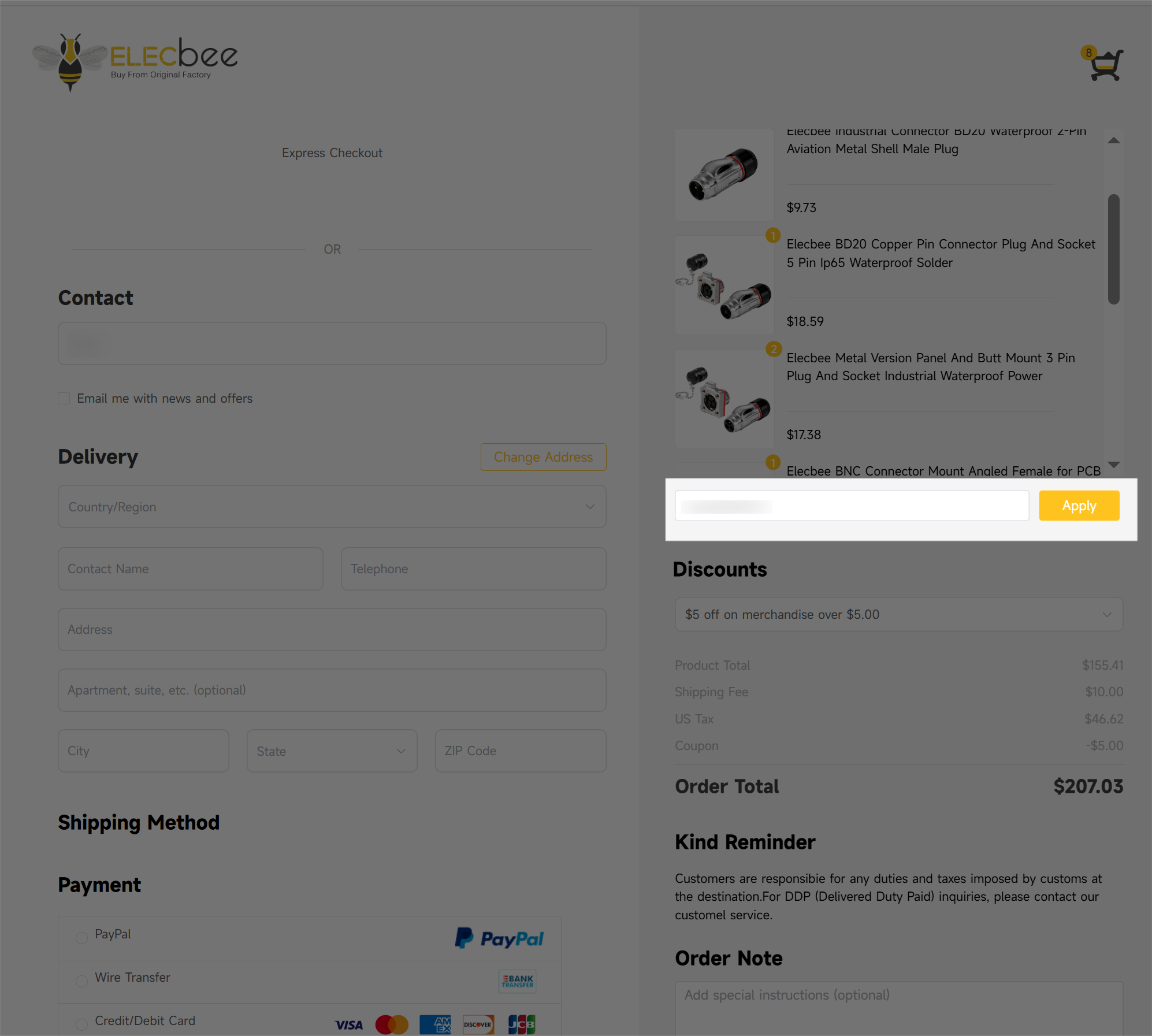
P.S.You can also manually enter or paste a coupon code in the coupon box and click “Apply” to use it.
4. Review and Complete Your Order
Confirm your order details to complete your purchase.
Your savings will be shown in the final payment summary.
Common reasons include:
If you believe your coupon should still be valid, please contact our customer service at support@elecbee.com.
All eligible products are offered at 15% OFF sitewide during the Mid-Year Appreciation Sale.
The discounted price will be automatically applied at checkout.
This is a limited-time promotion.
The Mid-Year Appreciation Sale ends on June 25 (PDT).
After the promotion ends, most product prices will return to their regular amounts.
Most products are included in the promotion.
However, custom items, special-priced products, or certain restricted categories may be excluded depending on availability and policy.
Yes.
During the Mid-Year Appreciation Sale, registered customers may claim additional bulk order coupons in the Coupon Center, including $25 OFF purchases over $499 and $50 OFF purchases over $999.
Yes.
Bulk order coupons can be used on top of the sitewide 15% OFF promotion when the coupon requirements are met.
Please make sure to claim and apply the coupon before completing payment.
No.
Once an order has been placed, the price at the time of purchase is considered final.
We do not offer retroactive discounts or price adjustments for previous orders.
The discount and coupons are valid only if the payment is successfully completed during the promotion period.
Orders paid after the promotion deadline will not receive the promotional discount.
Due to increased order volume during the event, minor processing delays may occur.
All orders will be processed and shipped in the order they are received.
Yes. Discounted items are eligible for returns or exchanges according to our standard return policy.
Refunds will be issued based on the actual amount paid, not the original product price.
Inventory availability is not guaranteed during the promotion.
Even if a product is listed as “in stock”, actual availability may change due to high demand.
Yes.
The website reserves the right to modify, suspend, or interpret the promotion within applicable legal limits.
If you have any questions about the Mid-Year Appreciation Sale or your order, our customer support team is ready to help.
Feel free to contact us anytime — we're happy to assist you.
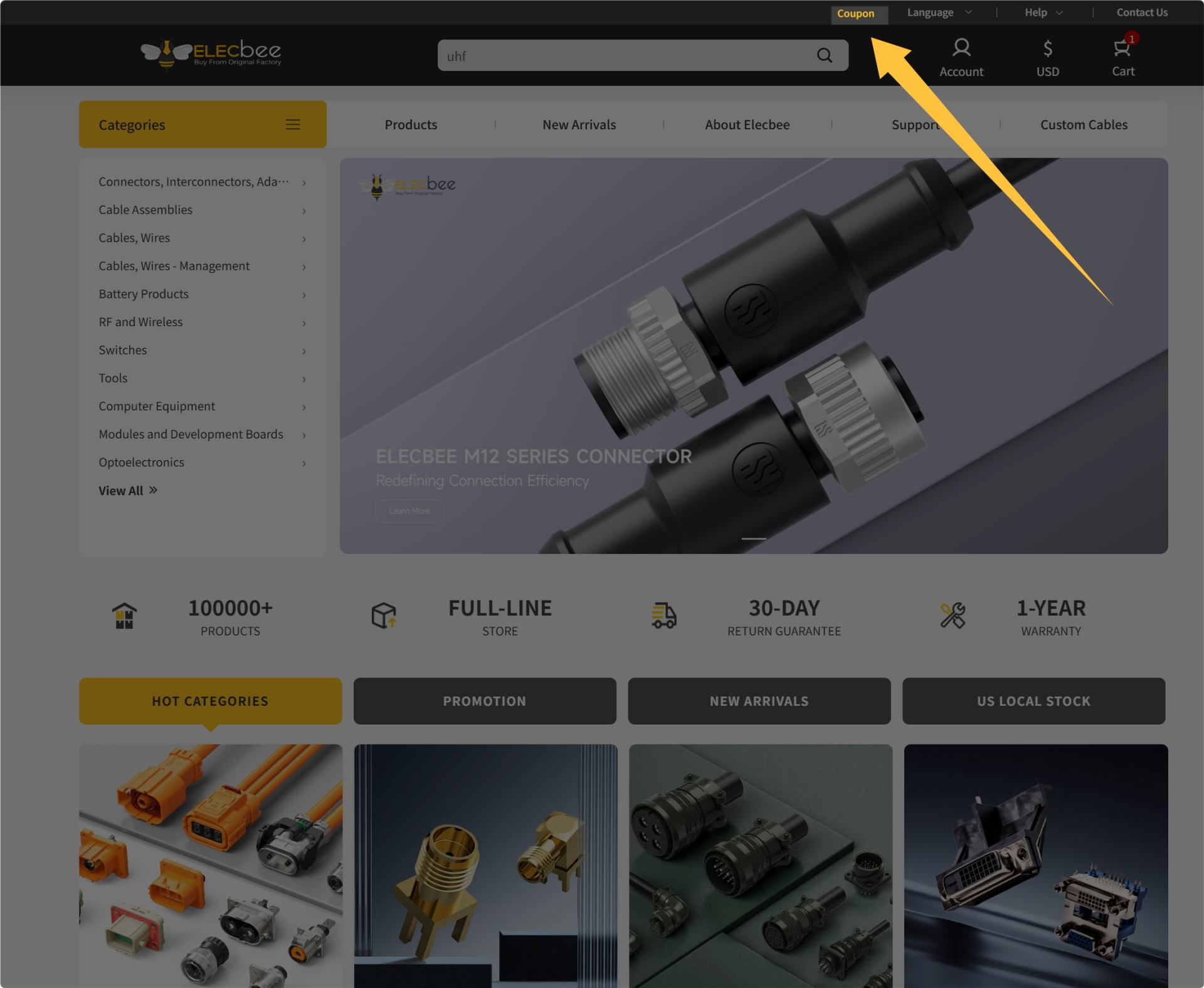
Step 1: Click the "Coupon" which is placed at the top of the homepage.
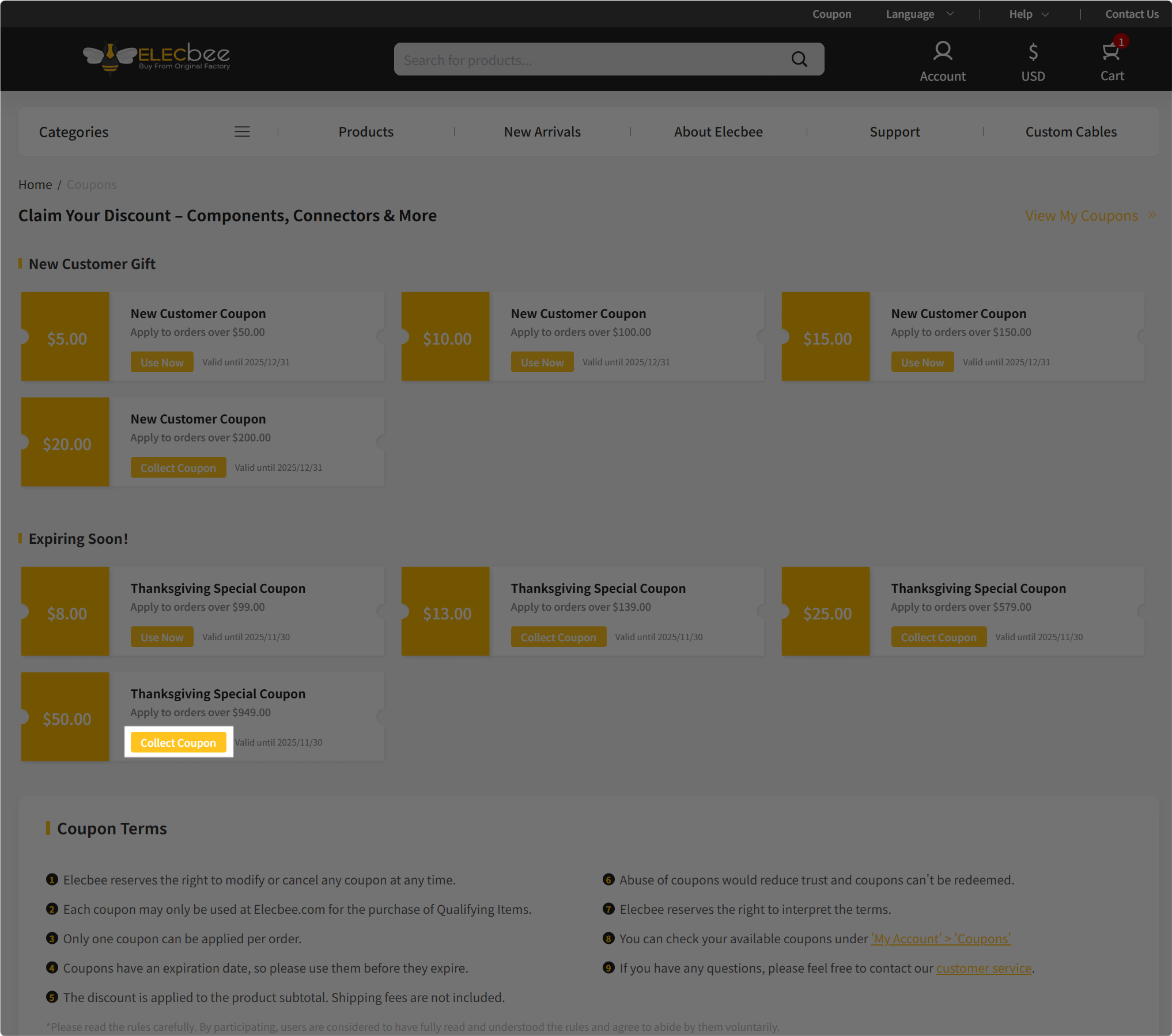
Step 2: You will be led to the page as shown below, then collect your coupons before the expiration date.
Note:
All eligible products are offered at 20% OFF sitewide. The discounted price will be shown automatically at checkout.
The promotion is available for a limited time only.
Once the event ends, prices will return to their original amounts.
This Christmas promotion ends on Dec. 30, 2025 (PST).
Most products are included.
However, custom items, special-priced products, or certain restricted categories may be excluded, depending on availability and policy.
No.Once an order is submitted, the price at that time is final. We do not offer price adjustments or retroactive discounts.
The discount applies only if the payment is successfully completed within the promotion period.
Orders paid after the deadline will not receive the discount.
Due to increased order volume, slight delays may occur.
We will process and ship all orders in the order they are received.
Yes, following our standard return policy.
Refunds for returned items will be based on the amount actually paid, not the original price.
Inventory is not guaranteed.
Even if an item shows as “in stock” on the website, actual availability may vary.
Yes. The website reserves the right to adjust, suspend, or interpret the promotion within applicable legal limits.
If you have any questions about this promotion or your order, our customer support team is here to assist you at any time. Feel free to contact us — we're happy to help!
All eligible products are offered at 15% OFF sitewide during the Spring Electronics Sale.
The discounted price will be automatically applied at checkout.
This is a limited-time promotion.
The Spring Electronics Sale ends on April 6 (PDT).
After the promotion ends, most product prices will return to their regular amounts.
Most products are included in the promotion.
However, custom items, special-priced products, or certain restricted categories may be excluded depending on availability and policy.
No.
Once an order has been placed, the price at the time of purchase is considered final.
We do not offer retroactive discounts or price adjustments for previous orders.
The discount is valid only if the payment is successfully completed during the promotion period.
Orders paid after the promotion deadline will not receive the promotional discount.
Due to increased order volume during the event, minor processing delays may occur.
All orders will be processed and shipped in the order they are received.
Yes. Discounted items are eligible for returns or exchanges according to our standard return policy.
Refunds will be issued based on the actual amount paid, not the original product price.
Inventory availability is not guaranteed during the promotion.
Even if a product is listed as “in stock”, actual availability may change due to high demand.
Yes.
The website reserves the right to modify, suspend, or interpret the promotion within applicable legal limits.
If you have any questions about the Spring Electronics Sale or your order, our customer support team is ready to help.
Feel free to contact us anytime — we're happy to assist you.
All eligible products are offered at 20% OFF sitewide.
The discounted price will be shown automatically at checkout.
This promotion is offered as a thank-you for your understanding during the Chinese New Year shipping pause.
The promotion is available from February 4(PST) to February 24 (PST).
Once the event ends, prices will return to their original amounts.
Most products are included.
However, custom items, special-priced products, or certain restricted categories may be excluded depending on availability and policy.
No.
Once an order is submitted, the price at that time is final.
We do not offer price adjustments or retroactive discounts.
The discount applies only if payment is successfully completed within the promotion period.
Orders paid after the deadline will not receive the discount.
Yes.
Due to the Chinese New Year holiday, our warehouse will temporarily suspend shipments starting February 10.
• Last shipping day before the holiday: February 9
• Orders placed from February 10 will be processed and shipped starting February 24, in the order received.
We recommend placing orders early to avoid potential delays.
Yes, in accordance with our standard return policy.
Refunds for returned items will be based on the actual amount paid, not the original price.
Inventory is not guaranteed.
Even if an item shows as “in stock” on the website, actual availability may vary due to high demand during the promotion period.
Yes.
The website reserves the right to adjust, suspend, or interpret the promotion within applicable legal limits.
If you have any questions about this promotion, shipping schedule, or your order, our customer support team is always happy to assist you.
Please note that due to the holiday period, response times may be slightly delayed. We appreciate your understanding.
Q1: Will Elecbee be affected during the Labor Day holiday?
Yes. From April 30 to May 4 (PDT), order processing, shipping arrangements, customer service, and email support will be temporarily paused for the holiday.
Q2: Can I still place orders during this period?
Yes — our website remains open and orders can be placed normally at any time.
💡 Ordering during the holiday is recommended so your order can enter the queue earlier once operations resume.
Q3: When will holiday orders be processed?
All orders placed during the holiday period will begin processing from May 5 (PDT).
Orders will be handled in sequence based on purchase time — first ordered, first processed.
Q4: Will customer service or email support be available?
During the holiday pause, live support and email responses will be temporarily unavailable. Our team will reply as soon as service resumes.
Q5: Why should I place my order now instead of waiting?
Because once the holiday ends, orders will be processed according to the time they were placed.
Q6: Will products still be available after the holiday?
Inventory levels may change during the holiday period. Ordering now helps reserve stock and reduce waiting time after reopening.
Q7: When will normal service resume?
Normal order processing, shipping, and customer support will resume on May 5 (PDT).
Q8: What’s the best way to avoid delays?
Place your order during the holiday period so it can be prioritized once the team returns.
🚀 Order now, queue earlier, ship sooner.

 0
0