

Search for products...

 0
0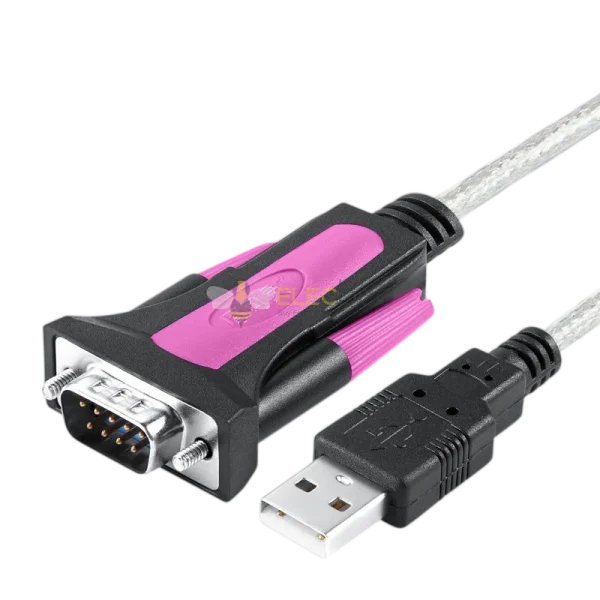
CH398 ACTIVE SERIAL ADAPTER: Engineering-grade version of an active USB 2.0-to-RS232 converter cable, designed for programming, configuration and serial communication with compatible industrial equipment.
CH340C+213 DUAL-CHIP DESIGN: Uses a CH340C USB-to-UART bridge with a supplier-identified 213 companion stage for RS232-level output. The complete manufacturer part number of the 213-marked component is not specified.
300–921600BPS OPERATION: Supports supplier-specified baud rates from 300bps to 921600bps. Configure matching baud rate, data bits, parity, stop bits and flow-control settings in the host software and connected equipment.
USB-A MALE TO DB9 MALE: Connects a compatible USB Type-A host to equipment with a mating DB9 female RS232 port. Retaining screws help secure the serial connector; confirm the required DTE/DCE pinout and straight-through or null-modem wiring.
MULTILAYER SHIELDED CONSTRUCTION: Copper conductors, an inner jacket, aluminum foil, tinned-copper braided shielding, four reinforcing cords and double-injection-molded housings support use around compatible PLCs, HMIs, CNC equipment and industrial instruments.
The Elecbee CH398 is an active USB 2.0-to-RS232 serial adapter cable for programming, configuring and communicating with compatible industrial equipment. It connects a USB Type-A host to equipment fitted with a DB9 female RS232 port.
The engineering-grade version combines a CH340C+213 dual-chip architecture, supplier-specified baud rates from 300bps to 921600bps, RS232-level output and a multilayer shielded cable structure.
Brand: Elecbee
Model: CH398
Version: Engineering Grade
Product Type: Active USB-to-RS232 serial converter cable
USB Bridge: CH340C
Companion Device: Supplier-identified 213-marked component
Architecture: Dual-chip conversion design
Host Interface: USB 2.0
USB Connector: USB Type-A male
Serial Connector: DB9 9-pin male
Connector Retention: DB9 fixing screws
Serial Output Level: RS232
Supplier-Specified Baud Rate: 300–921600bps
Driver: CH340-family driver or compatible OS-provided support
Supplier-Listed Systems: Windows 11/10/8.1/7/XP, macOS and Linux
Conductors: Copper core
Shielding: Aluminum foil and tinned-copper braid
Reinforcement: Four internal tensile cords
Housing: Double-injection-molded construction
Version Note: “Engineering Grade” is the supplier’s version designation. It should not be interpreted as an independently verified industrial certification or environmental rating.
The CH340C converts the host’s USB communication into UART serial data. A separate companion stage is required to translate the UART signals into the positive and negative voltage levels used by an RS232 interface.
The supplier identifies the conversion solution as CH340C+213. Because the complete part number and manufacturer of the 213-marked component are not supplied, this listing does not assign additional electrical specifications to that device.
Electrical-Level Warning: The DB9 connector provides RS232-level output. It must not be connected directly to a TTL UART input unless a suitable RS232-to-TTL converter is installed.
The cable supports a supplier-specified serial baud-rate range from 300bps to 921600bps. Lower rates accommodate compatible legacy equipment, while higher rates can be used when both the connected device and application support them.
The host software normally configures the required baud rate through the serial driver. The target equipment must be configured with matching baud rate, data bits, parity, stop bits and flow-control settings.
No Automatic Baud Guarantee: The available technical information does not establish independent automatic baud-rate detection. Select the correct rate in the applicable programming or communication software.
No Direction-Control Requirement: Standard RS232 uses separate transmit and receive signal paths. Automatic transmit/receive direction switching should not be advertised as a core RS232 function.
Host Connector: USB 2.0 Type-A male
Equipment Connector: DB9 9-pin male with retaining screws
The DB9 male connector mates with compatible equipment using a DB9 female RS232 port. Tighten the retaining screws carefully to reduce accidental disconnection.
DB9 connector gender does not determine the pinout. Confirm whether the equipment uses a DTE or DCE arrangement and whether the application requires straight-through or null-modem wiring.
Hardware handshake lines such as RTS, CTS, DTR and DSR are not confirmed in the supplied specifications. Verify the required pin connections before purchase.
The cable structure includes copper conductors, an inner jacket, aluminum-foil shielding and tinned-copper braided shielding. Four internal reinforcing cords add tensile support, while double-injection-molded housings protect the connector entry points.
The combined shielding is intended to reduce exposure to electromagnetic interference in electrically active environments. It does not guarantee error-free communication under every installation condition.
For improved signal integrity, separate the adapter cable from mains wiring, high-current conductors, motor cables and variable-frequency-drive outputs.
The CH398 requires CH340-compatible driver support. Some operating systems may include a suitable driver, while others may require manual installation.
The supplier lists Windows 11, Windows 10, Windows 8.1, Windows 7, Windows XP, macOS and Linux. Actual support depends on the exact operating-system version, architecture, security policy and available CH340 driver.
After installation, confirm that the adapter appears as a serial or virtual COM port. Select the assigned port in the applicable programming, terminal or device-configuration software.
The CH398 can be used with compatible PLC programmers, human-machine interfaces, electronic scales, LED displays, CNC machines, temperature controllers, industrial computers, control equipment and instruments fitted with a suitable DB9 female RS232 port.
The cable supplies the serial interface only. Device-specific programming software, communication protocols, project files and configuration instructions are not included.
Step 1: Obtain the appropriate CH340-family driver for the host operating system.
Step 2: Install the driver if the operating system does not already provide compatible support.
Step 3: Connect the USB Type-A plug and identify the assigned serial port.
Step 4: Confirm DB9 gender, pinout and RS232 voltage compatibility.
Step 5: Connect the DB9 male plug to the compatible equipment and secure the screws.
Step 6: Configure the correct baud rate, data bits, parity, stop bits and flow control.
Step 7: Test communication before beginning programming or equipment control.
Driver Support Required: Verify CH340 compatibility with the exact operating system.
RS232 Output: Do not connect the DB9 output directly to a TTL UART.
DB9 Male: Confirm that the connected equipment has a mating female port.
Verify the Pinout: Determine whether straight-through or null-modem wiring is required.
Set the Baud Rate: Do not rely on automatic baud detection.
Reduce Interference: Route the cable away from high-voltage and motor wiring.
Package Contents: 1 × Elecbee CH398 Engineering-Grade USB-A Male to DB9 Male RS232 Adapter Cable
Shipping | Delivery Period | Elecbee ships orders once a day at about 5pm except Sunday. Once shipped, estimated delivery time depends on the below carriers you chose. Express: 3-7 days. Standard Post: 7-20 days. | |
| Shipping Rates | Shipping rates for your order can be found in the shopping cart. | ||
| Shipping Options | We offer express and standard delivery services. | ||
| Shipping Tracking | We will notify you by email with tracking number once order is shipped. You can track your order using the “Track My Order” feature. | ||
| Returning/Warranty | Returning | Returns are normally accepted when completed within 30 days from date of shipment, please contact customer service for a return authorization. Parts should be unused and in original packaging. Customer has to take charge for the shipping | |
| Warranty | All Elecbee purchases come with a 30-day money-back return policy, plus 1-year Elecbee warranty against any manufacturing defects. | ||
| This warranty shall not apply to any item where defects have been caused by improper customer assembly failure by customer to follow instructions, product modification, negligent or improper operation | |||
| Ordering | How to Buy | Elecbee accepts online orders. | |
| Add to cart > Check out > Submit order > Complete payment > Delivery | |||
| Payment | PayPal, Credit Card includes Visa, Master, American Express, Bank transfer. | ||
