商品图

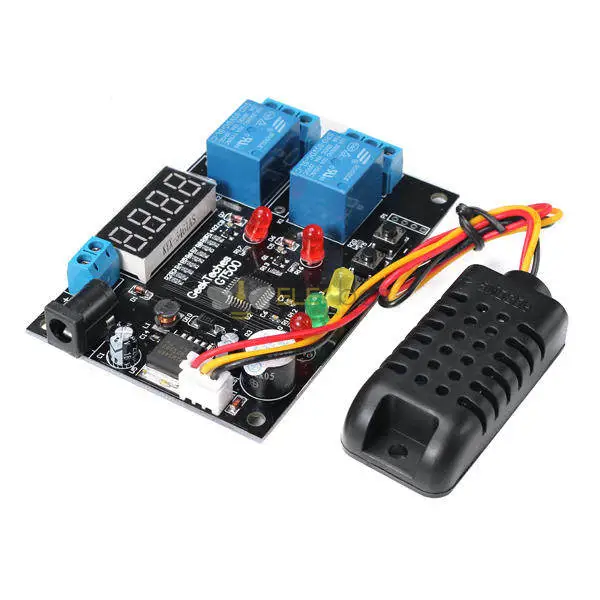
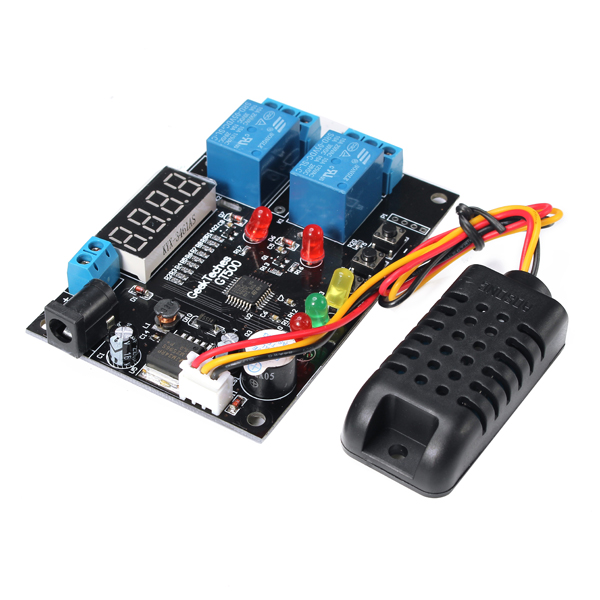
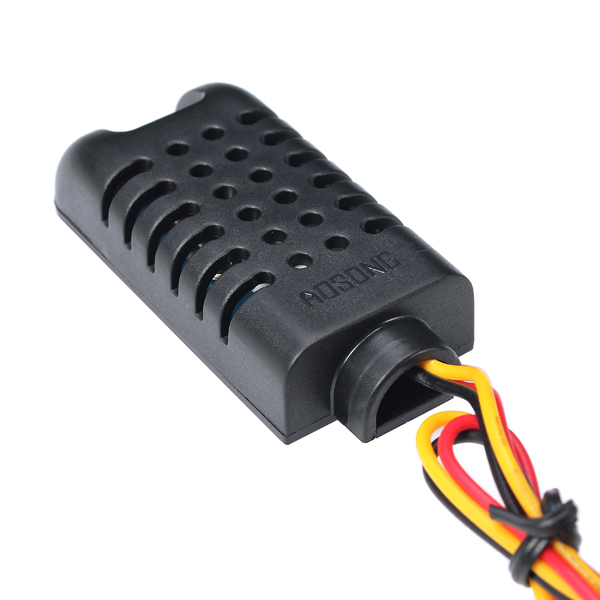
Elecbee GT500 Temperature And Humidity Control Module With Sensor And Connection Cable

SKU: EB0043183
Favorites

Key Features


Humidity measurement range: 0%RH~99.9%RH
Temperature measurement range: -40℃ ~80℃
Resolving power:xa0Humidity 0.1%RH,xa0Temperature 0.1
Measurement accuracy: ±3%RH; ±0.5%℃
Control accuracy:xa00.1%RH; ±0.1%℃
Refresh rate: 1S
Input voltage: 5V~24V DC
Measurement input: AM2301 temperature and humidity integrated sensor
Output: two way 10A relay
Environmental requirements: -10℃--60℃,xa0humidity 20%--85%
Overall power consumption:xa0Quiescent current≤20ma,xa0Pull current≤50ma.

Function:

- With temperature and humidity control function.
- Can display the current temperature and humidity in real time.
- With over limit alarm function.
- Relay working indication function.
- With power supply reverse protection function.The controller does not work when the power supply is connected to the counter.


Indicator light:
xa0
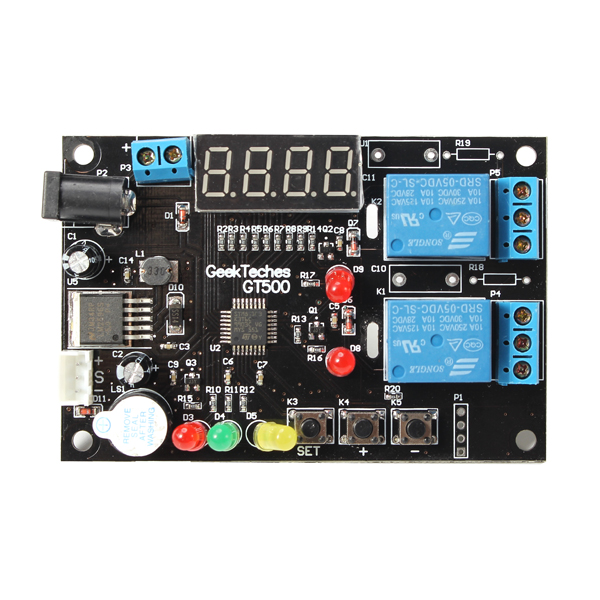
1. D8 is the temperature relay indicator lamp.Heating (cooling) equipment begins to work when the D8 light is turn on.
2. D9 is a humidity indicator relayxa0indicator lamp.xa0Humidification/xa0dehumidificationxa0equipment began to work when the D9 light is turn on.xa0
3. The display is showing the real time humidity valuexa0when the green D5 light is turn on.xa0The display is showing the real time temperature valuexa0when the D5 lamp goes out.

Function description:
xa0
1. High temperature start - cooling mode:
Refrigeration equipmentxa0begins toxa0workxa0when the starting temperature value is greater than the stop temperature value and the temperaturexa0measurement is greater than or equal to the beginning temperature.xa0Refrigeration equipment will stop workingxa0when the temperaturexa0measurementxa0is less than or equal to the stop temperature.
For example,xa0Set the starting temperature to 20℃,xa0Stop temperature is 15℃,xa0D8 light is turn on and refrigeration equipment work when the detection temperature is greater than or equal to 20℃.xa0D8 lightxa0went offxa0and refrigeration equipment will stop workingxa0when the temperature value is less than 15℃.
xa0
2. Low temperature start - heating mode:
Heating equipment begins to workxa0when the starting temperature value is less than the stop temperature value and the temperature is less than or equal to the beginning temperature.xa0Heating equipment will stop workingxa0when the test temperature is greater than or equal to the stop temperature.
For example,xa0Set the starting temperature to 15℃,Stop temperature is 20℃.xa0D8 lights is turn onxa0and Heating equipment begins to workxa0when the temperature measurementxa0value is less than or equal to 15℃. D8xa0lightxa0went off and Heating equipment to stop workingxa0when the temperature measurementxa0value is greater than or equal to the stop temperature.
xa0
3. High humidity start - Desiccant mode:
The system automatically determines the mode of the dehumidificationxa0when the startting humidity value is higher than the value of the stop humidity.In this mode,xa0dehumidificationxa0equipment to start workxa0when humidity detection is greater than or equal to the beginning of humidity.xa0Dehumidificationxa0equipmentxa0will stop workingxa0when the humidity detection is less than or equal to the stop humidity.
For example,xa0Set the starting humidity to 60%RH,xa0Stop humidity is 40%RH.xa0Indicator light D9 lamp is turn onxa0and dehumidificationxa0equipmentxa0start to workxa0when the detected humidity value greater than or equal to 60%RH.xa0Indicator light D9 went off and dehumidificationxa0equipmentxa0to stop workingxa0when Humidity detection value is less than or equal to 40%RH.
xa0
4. Low humidity startxa0-xa0humidification mode
The system automatically enters the humidification modexa0when the set start humidity is less than the value of the humidity value.xa0In this mode,xa0Humidification equipment began to workxa0when the humidity detection is less than or equal to the beginning of humidity. Humidification equipment will stop workingxa0when the humidity detection is Greater than or equal to the beginning of humidity.
For example,xa0Set the starting humidity to 40%RH,xa0Stop humidity is 60%RH, Indicator light D9 is turn on andxa0humidification equipment into the workxa0when the humidity detection value is less than or equal to 40%RH.xa0Indicator light D9 went off and humidification equipmentxa0to stop workingxa0the humidity detection value isxa0greater than or equal to 60%RH.
xa0
5. Temperature alarm mode:
Display showing Axx (default is A00) and flashing in the boot 3 seconds, You can use "+" and "-" to set the alarm
Mode,xa0Alarm modes are defined as follows:
A00: alarm function off (default)
A01: the currently detection of humidity beyond the starting temperature or stop temperature of 1℃, buzzer alarm.
A02: the currently detection of humidity beyond the starting temperature or stop temperature of 2℃, buzzer alarm.
A03: the currently detection of humidity beyond the starting temperature or stop temperature of 3℃, buzzer alarm.
and so on,xa0max can be set A30.
For example ,Set alarm mode A03,xa0Starting temperature is20℃,Stop temperaturexa0isxa030℃, Buzzer sound alarm when the measured temperature is above 33℃xa0or below 17℃.

Concrete setting method:

Notes:xa0The following settings are automatically saved to EEPROM
1. Set start temperature:
Long press S button for 3 seconds,xa0Red light D3 start flashing. Display showing starting temperature value at this moment, Press + and - button to adjust this value, Long press is continuous adjustment. Long press S button to exit the adjustmentxa0after the adjustment is completedxa0or automatic exit without key action in 10S.
2. Set stop temperature:
Long press S button for 3 seconds,xa0Red light D3 start flashing. Short press SET button once againxa0and red LED D3 long bright,xa0Display showing stopxa0temperature value at this moment,xa0Press + and - button to adjust this value,xa0Long press is continuous adjustment.xa0Long press S button to exit the adjustmentxa0after the adjustment is completedxa0or automatic exit without key action in 10S.
3. Set up the startingxa0humidity:
Long press S button for 3 seconds,xa0Red light D3 start flashing.xa0Short press SET buttonxa0twice againxa0and red LED D4xa0start flashing.xa0The display screen displays the starting humidity value, this value can be adjusted by pressing the + and - buttons,xa0long press is continuous adjustment.xa0Long press S button to exit the adjustmentxa0after the adjustment is completedxa0or automatic exit without key action in 10S.
4. Set the stop humidity
Long press S button for 3 seconds,xa0Red light D3 start flashing.xa0Short press SET buttonxa0three times againxa0and red LED D4xa0start flashing.xa0Display screen displays the value of the stop humidity at this time, this value can be adjusted by pressing the + and – buttons, long press is continuous adjustment.xa0Long press S button to exit the adjustmentxa0after the adjustment is completedxa0or automatic exit without key action in 10S.
5. Set the temperature model
Long press S button for 3 seconds,xa0Red light D3 start flashing.xa0Short press SET buttonxa0fourxa0times againxa0and red LED D3 and LED D4xa0startxa0flashingxa0atxa0thexa0samexa0time. At this time the display screen display "C" or "F", this value can be adjusted by pressing the + and – buttons.xa0C means that the current temperature model is degrees Celsius,xa0F means that the current temperature pattern is Fahrenheit.xa0Long press S button to exit the adjustmentxa0after the adjustment is completedxa0or automatic exit without key action in 10S.
6. Set alarm mode
See also "function description" 5.temperature alarm mode.
7. Restore factory settings
Hold + and - press the button and then boot,xa0Display screen display "rrrr",xa0All settings are restored to factory settings after Buzzer sound threexa0times.


Indicator status:


Show More
Description
Product electrical

1 x Temperature And Humidity Control Module
1 x Sensor
1 x Connection Cable

GT500-Temperature-And-Humidity-Control-Module-With-Sensor-And-Connection-Cable-1092598

GT500-Temperature-And-Humidity-Control-Module-With-Sensor-And-Connection-Cable-1092598

GT500-Temperature-And-Humidity-Control-Module-With-Sensor-And-Connection-Cable-1092598

GT500-Temperature-And-Humidity-Control-Module-With-Sensor-And-Connection-Cable-1092598
Shopping Guide
Shipping
Delivery Period
For in-stock parts, orders are estimated to ship out in 3 days.
Elecbee ships orders once a day at about 5pm except Sunday.
Once shipped, estimated delivery time depends on the below carriers you chose.
DHL Express: 3-7 business days
DHLeCommerce: 12-22 business days
FedEx International Priority: 3-7 business days
EMS: 10-15 business days
Registered Air Mail: 15-30 business days
Shipping RatesShipping rates for your order can be found in the shopping cart.
Shipping OptionsShipping rates for your order can be found in the shopping cart.
Shipping TrackingWe will notify you by email with tracking number once order is shipped. You can track your order using the “Track My Order” feature.
Returning/WarrantyReturningReturns are normally accepted when completed within 30 days from date of shipment, please contact customer service for a return authorization. Parts should be unused and in original packaging. Customer has to take charge for the shipping
WarrantyAll Elecbee purchases come with a 30-day money-back return policy, plus 1-year Elecbee warranty against any manufacturing defects.
This warranty shall not apply to any item where defects have been caused by improper customer assembly failure by customer to follow instructions, product modification, negligent or improper operation
OrderingHow to BuyElecbee accepts online orders.
Add to cart > Check out > Submit order > Complete payment > Delivery
PaymentPayPal, Credit Card includes Visa, Master, American Express, Bank transfer.
Reviews
ELECBEE
All reviews come from verified purchasers
5
0%
4
0%
3
0%
2
0%
1
0%
In-Stock:9999
Qty.
1
Unit Price
$ 18.70$ 22.00
Ext. Price
$ 18.70$ 22.00
$ 18.70$ 22.00
Can Ship in 1-3 Business Days